I remember few weeks ago I got problem with my Windows. I was not being able to open my C and D drives using the normal double click method. I need to right click on the drive and either click ‘Explore’ or ‘Open’.
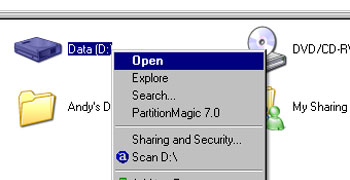
I need to right click and open.
I’m sure there’s nothing wrong with my double click function because this thing only happens when I click on the drive, not the folders or other directories. I tried to scan with Avast, AVG and Norton Antivirus, nothing found.
After searching for the solution in few forums, I finally knew that there’s something to do with autorun.inf file. If you found this file in your drive partition, just delete them manually. In this case, I use portable antivirus to do the job. Don’t worry; portable antivirus is a standalone antivirus which detects unnecessary files in your pc. Yet, it’s a freeware!
Scan all your partition using portable antivirus:
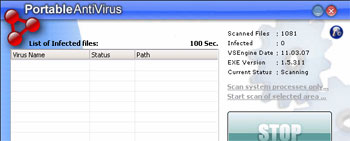
If there are autorun.inf files found, they will be automatically deleted (You can set it manually).
You are done.
If you are using USB storage media (thumb drive, external hardrive etc), you need to disinfect the drive. Most probably the double click problem will occur again if you plug in the storage media in your machine. I suggest you to use Flash Disinfector (you can find the software here). It’s also a standalone application. All you have to do: Plug in the USB storage media and run Flash Disinfector. You are done.
Now, reboot your PC. Tadaaaa…Your problem solved.
Note: This is my personal method and it works! Only for windows user. All the best!
[tags]double click, portable antivirus, flash disinfector, usb drive[/tags]

Thank you.. It worked
[Me : Glad to know that Nikitul.]
Hi,
I have the same problem with you, just a little difference is that I can not open using the 2 way you said above, only can use explore.
Could you please give me your advice in this case?
Thanks,
Lam
[Me : Hi Lam, have you tried the method i use in this post? I think the problem quite similar.]
nice informative.. 🙂
[Me : Ya thanks. Just trying to help.]
Hi,
Similar problem, but the autorun will self generated into the same directory. I have try scanning with Sophos, AVG, Symantec… but all no detected what is wrong… is it a Win32.Codox-A? But it cant detected by Sophos like whta they claim
HELP!
[Me : Heng, maybe there’s something running in the backend. Try to use HijackThis to scan. Delete / fix suspicious program which you think the root for the problem you faces. But be careful. Make sure you know what you’re doing, or else your windows will not working well. Give it a try, bro.]
For sure just download Mcafee 9.0, i had 3 pc, all hit this problem autorun.inf and bha vbs.dll.
I install mcafee9.0 then perform full scan…it success.
but make sure the mcafee was up to date, then only perform full scan. hope this might help other’s