Sarawak Bloggers

I’ve upgraded my Ubuntu recently and i just leave all my old kernels in my machine. Long list of kernels in the GRUB list during boot up of course. :p Although you can use Ailurus to manage all these, i came across this quick method on how to remove all kernels except the current kernel in one go.

Open your terminal CTRL+ALT+T and paste this command:

dpkg -l ‘linux-*’ | sed ‘/^ii/!d;/’”$(uname -r | sed “s/\(.*\)-\([^0-9]\+\)/\1/”)”‘/d;s/^[^ ]* [^ ]* \([^ ]*\).*/\1/;/[0-9]/!d’ | xargs sudo apt-get -y purge
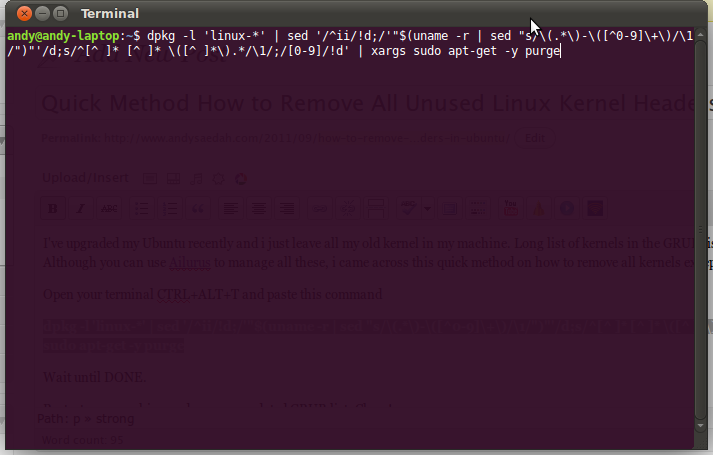
Wait until DONE.

Restart your machine and see your updated GRUB list. Clean!

Thanks Ubuntu Genius!


Post comment

About This Blogger

Hi! I\\\'m a professional an ordinary blogger who blogs about what is happening in my daily life, the food i love, the softwares i use, the gadgets i own and also the technologies around me. Now i am on my way completing my Project 365, a photo a day for this blog!

My Blogging Tools:

  • - Nikon D60
  • - Blackberry
  • - BlogDesk

My Timeline

#CoolStuff

Network

In My Shooting Bag


Blog Categories

I’m a Supporter

Miscellaneous

Vote for The Living
 Earendur  blog rating and reviews  Top Blogs  Personal Blogs - Blog Top Sites  Blog Flux Directory  Droool.NET     Blogarama - The Blog Directory  Best Malaysian Sites

Spam Blocked